
Achieving a fluid, cinematic aesthetic in aerial videography requires understanding the relationship between frame rate and shutter speed. In bright daylight, high shutter speeds can make video look choppy or hyper-sharp. Neutral Density (ND) filters are essential tools that let you control light transmission and restore natural motion blur.
For creative professionals, mastering the math behind filter density is key to maintaining exposure control without compromising on visual quality.
The 180-Degree Shutter Rule
The 180-degree shutter rule is a filmmaking standard. It dictates that your shutter speed should be set to the reciprocal of double your frame rate. If you are recording video at 24 frames per second (fps), your shutter speed should be locked at 1/50th of a second. If you are shooting at 30 fps, your shutter speed should be locked at 1/60th of a second.
In bright daylight, matching these slow shutter speeds at a low ISO (e.g., ISO 100) will result in a completely overexposed image. Because many drone cameras feature a fixed aperture (often locked at f/2.8), you cannot narrow the iris to cut the light. The only solution is to place a physical ND filter over the lens to reduce light entry.
ND Filter Density Guide
ND filters act as sunglasses for your camera sensor. They reduce the amount of light entering the lens by a set number of stops without altering the color temperature of the scene. The table below lists the common filter values and their corresponding light reduction profiles:
| Filter Type | F-Stop Reduction | Light Transmission | Best Operating Conditions |
|---|---|---|---|
| ND4 | 2 Stops | 25% | Overcast skies, golden hour, dawn/dusk |
| ND8 | 3 Stops | 12.5% | Partly cloudy days, soft winter light |
| ND16 | 4 Stops | 6.25% | Standard bright daylight, clear morning/afternoon |
| ND32 | 5 Stops | 3.13% | Intense direct sunlight, desert environments |
| ND64 | 6 Stops | 1.56% | Extremely bright sun, snow fields, water reflections |
Flight-Ready Breakdown
Creative BriefWhat Changed
Fixed-aperture drone lenses force pilots to use physical ND filters to manage exposure while maintaining slow shutter speeds.
Why It Matters
Without ND filters, high shutter speeds remove all motion blur, creating a harsh, stuttering effect on moving ground details.
Before Your Next Mission
Select your frame rate, lock your shutter speed at double that rate (e.g., 24fps at 1/50s), and mount the ND filter that delivers a balanced exposure at ISO 100.
Practical Field Workflows
To determine the correct filter in the field, check your exposure meter on your controller with no filter attached. If your shutter speed is locked at 1/50s and the image is overexposed by 4 stops, mount an ND16 filter. Always calibrate your camera's white balance manually rather than using auto-white balance, as some cheaper filters can introduce a minor color cast that is easier to fix in post-production if it remains consistent across your clips.

Related Briefs
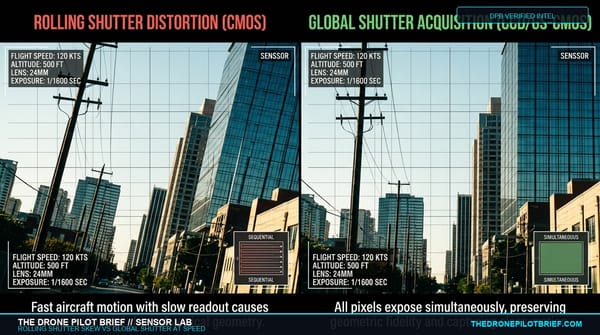
Rolling Shutter vs. Global Shutter at Speed: The Geometric & Cinematic Sensor Benchmark
Why do vertical telephone poles lean at 15 m/s and why does 4K cinema footage develop 'jello'? We bench-tested CMOS sensor readout speeds across aerial photogrammetry reconstructions and high-speed cinema passes....
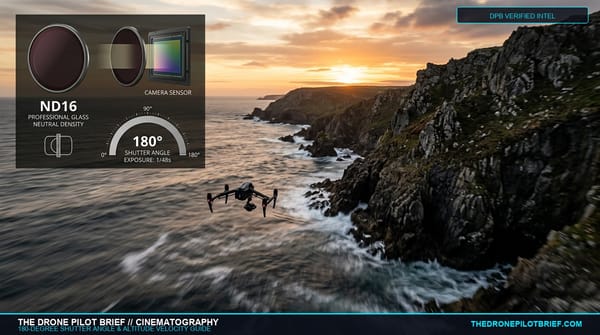
The 180-Degree Shutter Rule at 400 Feet: Why Ground Speed Dictates ND Filters More Than Sunlight
Slapping an ND16 on your drone because it is sunny outside is a recipe for stuttery footage. Here is the operational physics behind angular motion blur at altitude and how to calculate your true shutter angle....

Color Grading Log Video from DJI Mavic 3 Cine
A practical, step-by-step workflow for achieving professional dynamic range and rich tones in DaVinci Resolve....
Get The Preflight
The weekly operational-intelligence briefing for drone pilots. Filtered down to what actually matters before your next mission.